Build your first MCP-assisted client service in a seven-day sprint
Deliver one useful client result with a practical seven-day plan, scoped proposal, acceptance tests and an editable handoff kit.

Your first MCP-assisted service can be a small, useful piece of a client’s week: a better research brief, a clean project handoff or a source-linked review pack. A clear deliverable gives you a way to demonstrate value, control the work and learn what customers actually need.
This seven-day sprint helps you choose a task, prepare a sample, connect approved information and deliver a pilot with a usable handoff. The companion pocket product includes the intake, scope, proposal, acceptance tests and handoff templates. You can use it to plan a service even if your first version is entirely manual.
Start with a service someone can recognize
A client should be able to understand your offer without learning a protocol. “A weekly project update with source links, open questions and a review checklist” describes a result. It also makes room for an honest conversation about where information comes from, how it is checked and what remains the client’s decision.
MCP, or Model Context Protocol, can connect an AI application to a server exposing tools and resources. In a client service, that might help retrieve approved project information. The server may wrap an existing API, while the original application continues to enforce access. You still need a useful output format and a review process.
WebMCP is different: it is an experimental browser API proposal that lets an open webpage expose structured actions. It may be useful for a workflow that depends on the current page. You do not need WebMCP to deliver the service in this guide, and the presence of MCP does not make a workflow autonomous or reliable by itself.
We will use a fictional example throughout: a small creative studio wants a Friday project review brief. It contains active milestones, missing inputs and decisions for the owner. The pilot covers one project and prepares a draft only. It does not send client messages, change due dates or update budgets.
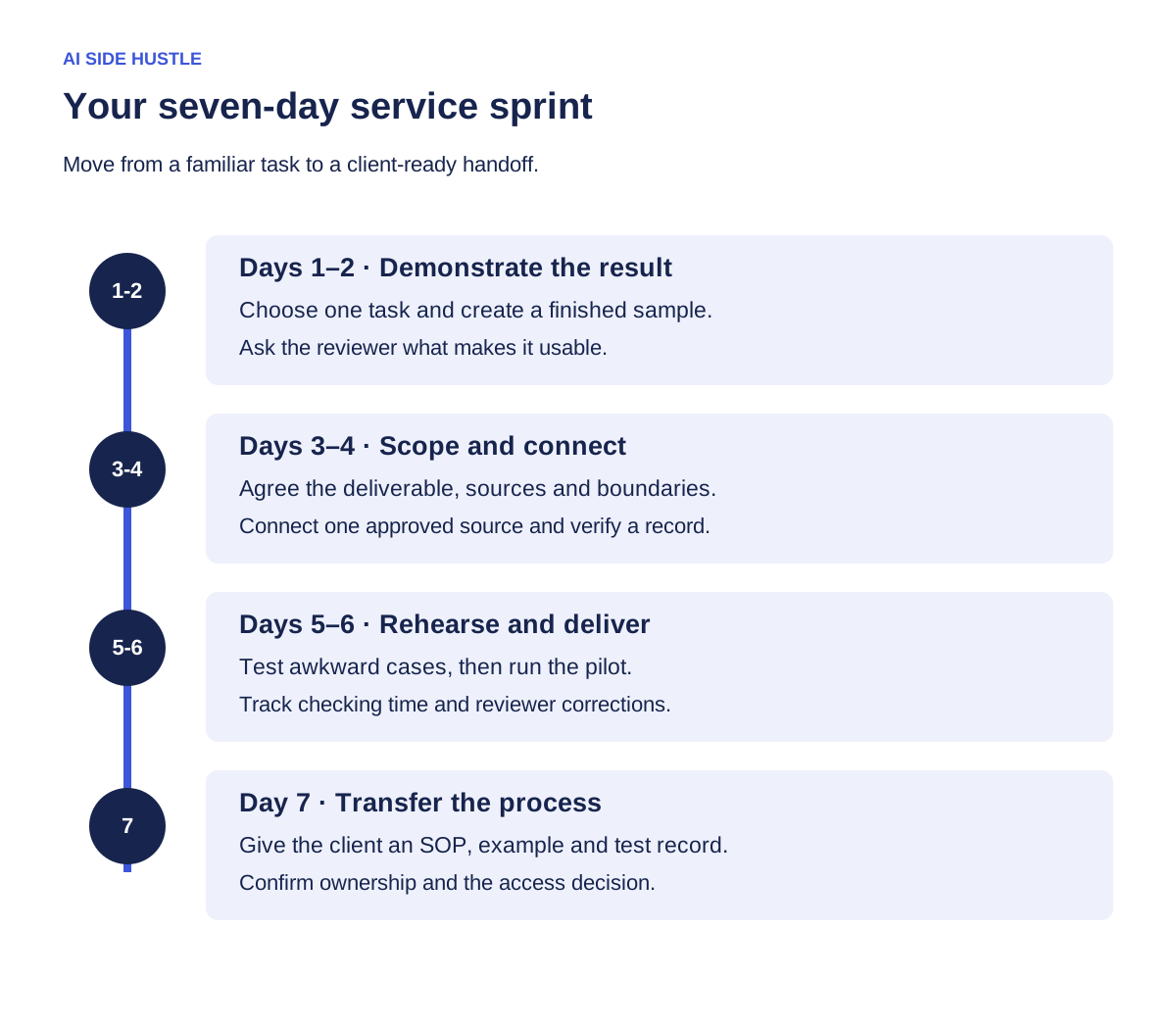
Day 1: choose one recurring job
List three tasks you understand well enough to check. Look for repeated information gathering, synthesis or preparation. Good candidates have accessible inputs, an obvious reviewer and an output that can be compared with a previous example. Your own experience matters: marketing, curriculum, design operations and project coordination each contain distinct judgments a generic tool cannot supply.
Choose the task with the clearest acceptance rule. For the studio, every claimed milestone must link to an approved source, every missing fact must be labeled and every recommended decision must identify its owner. Those rules are more useful than “make a professional report,” because they can be tested.
Write a task card with five items: trigger, source, output, reviewer and finish condition. Then ask a potential client to describe their most recent instance. Find out how long it took, which parts were annoying and what made the final output usable. Do not assume that the most time-consuming task is the one they would pay to delegate.
| Service | First pilot boundary | Acceptance rule |
|---|---|---|
| Project review brief | One project, one reporting date | Every status has a source or is marked unknown |
| Research shortlist | One question, one approved collection | Each recommendation includes evidence and limitations |
| Content repurposing pack | One approved source, three draft formats | Claims remain supported and brand review is complete |
Day 2: make a sample worth reviewing
Create a finished example before you connect live systems. Use fictional information or material you have permission to use. Label the example so nobody mistakes it for real client work. Aim for the output you would be comfortable delivering: clear headings, concise decisions, source links and an explicit list of unanswered questions.
For the fictional studio, the sample brief includes a reporting date, three milestones, two missing inputs and a proposed agenda. One milestone has conflicting dates in the source material. The draft preserves the conflict and asks the project owner to resolve it. That is a useful demonstration of judgment; silently choosing a date would hide the problem.
Ask the reviewer to annotate the sample. Which parts would save effort? Which details are missing? What would stop them using it? Turn the answers into a version-two output template. If the reviewer wants a spreadsheet instead of a narrative brief, change the deliverable before you invest in integration work.
Save both the original and revised examples. Your service documentation should show what “good” looks like. A small collection of reviewed examples also helps you spot when the workflow starts producing weaker results after a change.
Day 3: put the agreement into plain language
A pilot needs a written scope even when it is small. Name the input collection, the number of outputs, the delivery date, the reviewer and the revision allowance. State what must happen before work begins. Access delays and missing source material are common reasons a short assignment expands.
The scope template in the kit separates three things: included work, client responsibilities and excluded actions. For the studio pilot, included work is one draft review brief and one revision against the agreed criteria. The client provides the approved source folder and a reviewer. Sending the brief externally, changing records and adding other projects require a separate agreement.
Choose the price only after estimating intake, setup, production, checking, revisions and handoff. Record assumptions about each. A pilot price is a test of a defined offer; it does not prove demand for a larger subscription. Keep the payment terms consistent with the process you can actually support.
Send a short proposal that includes the outcome, a sample, scope, timing, price and next step. Describe what is already working and what the pilot will test. If you have only a prototype, call it a prototype. You can still make the proposal compelling by showing exactly how the client will judge the result.
Day 4: connect the smallest useful information source
Use an existing official integration when it covers the task. In a compatible AI application, follow the provider’s documented setup process, check which account is being connected and inspect the tools the server exposes. Ask the client to authorize the specific source and access required for the pilot. Keep access ownership with the client.
- Write the request first. Example: “Retrieve the approved milestones for Project Alpha as of Friday. Include source references and flag missing dates.”
- Review the tool scope. Identify which capability retrieves the information and whether it can also change records.
- Run a small retrieval. Use one known item so you can compare the response with the source.
- Check the output. Confirm the project, date, permissions and source references before asking for a synthesized brief.
If you need a custom MCP server, define one narrow tool contract and implement it against a supported service interface. For example, get_project_review_inputs could accept a project ID and reporting date, then return approved milestones and missing fields. Validate inputs and enforce access in the backend. A descriptive “read-only” label is not a security control.
Practice the technical mechanics with the tested AI Teachers MCP starter lab. Its fictional data lets you understand discovery and tool calls before connecting a client system. If a custom integration is outside your current skills, partner with a developer or keep the pilot manual while you validate the service.
Day 5: rehearse the awkward cases
A happy-path demo tells you little about the Friday when a source is missing. Rehearse the cases that would make the deliverable misleading. The service acceptance sheet includes empty results, conflicting facts, unavailable access, stale information and an instruction embedded inside source content.
For each case, write the expected behavior. An empty result should be labeled as empty, not filled with invented milestones. A source containing instructions to send information elsewhere should remain source content, not become permission to act. A restricted record should stay restricted. A failed connection should produce a clear recovery step.
Run the whole workflow from the client’s request to the final document. Check whether the assistant preserves uncertainty and source links after summarizing. Record the result, reviewer and date for every test. A passing tool response does not automatically mean the delivered brief is correct.
Decide when a person must take over. For the studio, unresolved conflicts go to the project owner before the brief is accepted. Keep a manual fallback: a source checklist and output template that still work when the connection is unavailable. That fallback is part of a dependable service.
Day 6: deliver the pilot and measure your effort
Work from the agreed inputs and reporting date. Track your hands-on time in useful categories: intake, setup, retrieval, drafting, checking, revisions and handoff. Also record any direct service costs. These details help you find the real delivery bottleneck and price later work with better information.
Deliver the artifact with a short review note. State what it covers, which sources were used, what remains unresolved and what the reviewer should check first. Keep the acceptance criteria beside the work so the client can respond specifically. “Please confirm the milestone dates and decision owners” is easier to act on than “Thoughts?”
When feedback arrives, separate defects from new requests. A missing agreed field is a defect to fix. Adding a second project is a scope change to discuss. This distinction protects the client’s expectations and your ability to finish the pilot cleanly.
Compare the delivered outcome with the baseline, using the same definition of completion. If the client previously spent an hour gathering information but your version needs forty minutes of correction, record both. You need the full human effort, not just the model’s runtime, to understand whether the workflow improved.
Day 7: hand over something another person can use
The final deliverable includes operating instructions. Document the trigger, inputs, sequence, checks, failure behavior and owner. Add a worked example, the known limitations and a short change log. Specify how access will be removed or retained at the end of the pilot according to the agreement.
Have the client or another reviewer follow the instructions once. Watch where they hesitate. If they need you to explain an undocumented step, improve the handoff. This is a practical way to discover whether you have a repeatable service or a process that only works in your head.
Offer the next step based on what the pilot revealed. It might be another delivery, a setup package, a maintenance arrangement or a smaller self-serve kit. Ask whether the client wants that next step; do not treat a successful pilot as automatic permission to keep accessing systems or running work.
Your Seven-Day MCP Service Sprint pocket product
Use the interactive planner to capture the service’s buyer, task, source, output and acceptance rule. Download the editable templates and replace every bracketed field with your own information. The fictional studio example is included to show the level of specificity you are aiming for.
- Client intake: gather the workflow, access owner and example output.
- Pilot scope: make the deliverable, boundaries and revision process explicit.
- Proposal: present the outcome, evidence and next step clearly.
- Acceptance tests: rehearse the cases that could damage the result.
- Handoff: give the client a repeatable process and a clear owner.
The seven days are a planning structure, not a deadline you must force. If access, review or testing takes longer, adjust the schedule. Finish with a service you can explain, demonstrate and deliver consistently, then use what you learned to choose the next improvement.
Sources and further learning
The sprint and fictional studio example are original to this guide. Technical references: official MCP architecture, VS Code MCP connection guidance, MCP security best practices and Chrome WebMCP guidance. Use the current provider instructions for the integration you choose.
Explore another application
- The Wealth Experiment: From one useful AI connection to a pocket product people can evaluate
- Waymaker: From idea to connected MVP: build one MCP tool people can use
- OutcomeDriven: Did the agent actually help? A practical MCP workflow experiment
- MarketingCoach: Give your marketing agent the evidence before you give it the controls
- CodeTeachers: Build a resource-finder MCP server—and prove it works